 Inducta Flow
Every person on your site signed in, inducted and covered. From one QR code.
Inducta Flow puts sign-in, Task Analysis sign-on, hazard reports and subcontractor paperwork behind a sign on your fence. Workers scan it with their phone camera. No app, no logins, and you see it all live.
14 days free with every feature. From NZ$109 a month after that. Prices in NZ dollars. No GST is added.
 Harbourside Builders
No app for workers. The phone camera opens the forms.
Works with no signal. Forms send when the phone is back in range.
Unlimited workers. One price for the business.
New Zealand rules built in. Task Analysis, WorkSafe and Site Safe.
The clipboard in the site shed, done properly
Paper sign-in sheets go missing, Task Analyses sit unread in a folder, and nobody notices a subbie’s insurance has lapsed until something goes wrong. Inducta Flow replaces all of it with one sign per site.
Your crew and subbies do it on their own phones in under a minute. You get a clean record of who was on site, what they signed and what they reported, ready for a client, a main contractor or an inspector.
One sign. Everything your site needs.
Compare plansKnow who’s on site, right now
Workers scan the sign and sign in with their name, company and an induction check. The register builds itself, sign-outs included, and you can see everyone on site from the office or the ute.
How site sign-in worksTask Analyses that get read and signed
Start from a template for notifiable hazardous work, adapt it to the job and switch it on for the sites it applies to. Workers read it on their phone and sign, and every signature records the version they signed.
How task analysis sign-on worksSubbie paperwork that chases itself
Send each subcontractor a link. They upload their insurance and licences, AI reads the expiry dates, reminders go out before anything runs out, and sign-in can warn or block when something has expired.
How subcontractor compliance worksHazards reported before they hurt someone
Anyone on site can report a hazard or incident with a photo in under a minute. Open items stay on your dashboard until they’re closed, and serious incidents show who to call: WorkSafe (0800 030 040).
How hazards and incidents worksUp and running before the first delivery
Add your site
Name, address and supervisor. It takes about a minute, and the site gets its own QR code straight away.
Put the sign on the fence
Print the free sign on any printer, or order a weatherproof corflute sign to cable-tie to the fence.
Workers scan and go
They open their camera, tap the link and fill in the form. Their details are remembered for next time.
Made for New Zealand, not adapted from somewhere else
Task Analysis templates, WorkSafe’s notifiable work and incident rules, 111 on every form, and Site Safe passports and NZBNs in subcontractor checks. We check for rule changes every week.
- TATask Analysis templates
- 111Emergency number on every form
- WorkSafe0800 030 040 for notifiable events
- Site SafePassport checked at sign-in
- NZBNOn every subcontractor
- LBP · EWRB · PGDBLicences tracked with expiry reminders
Your QR sign, ready to print
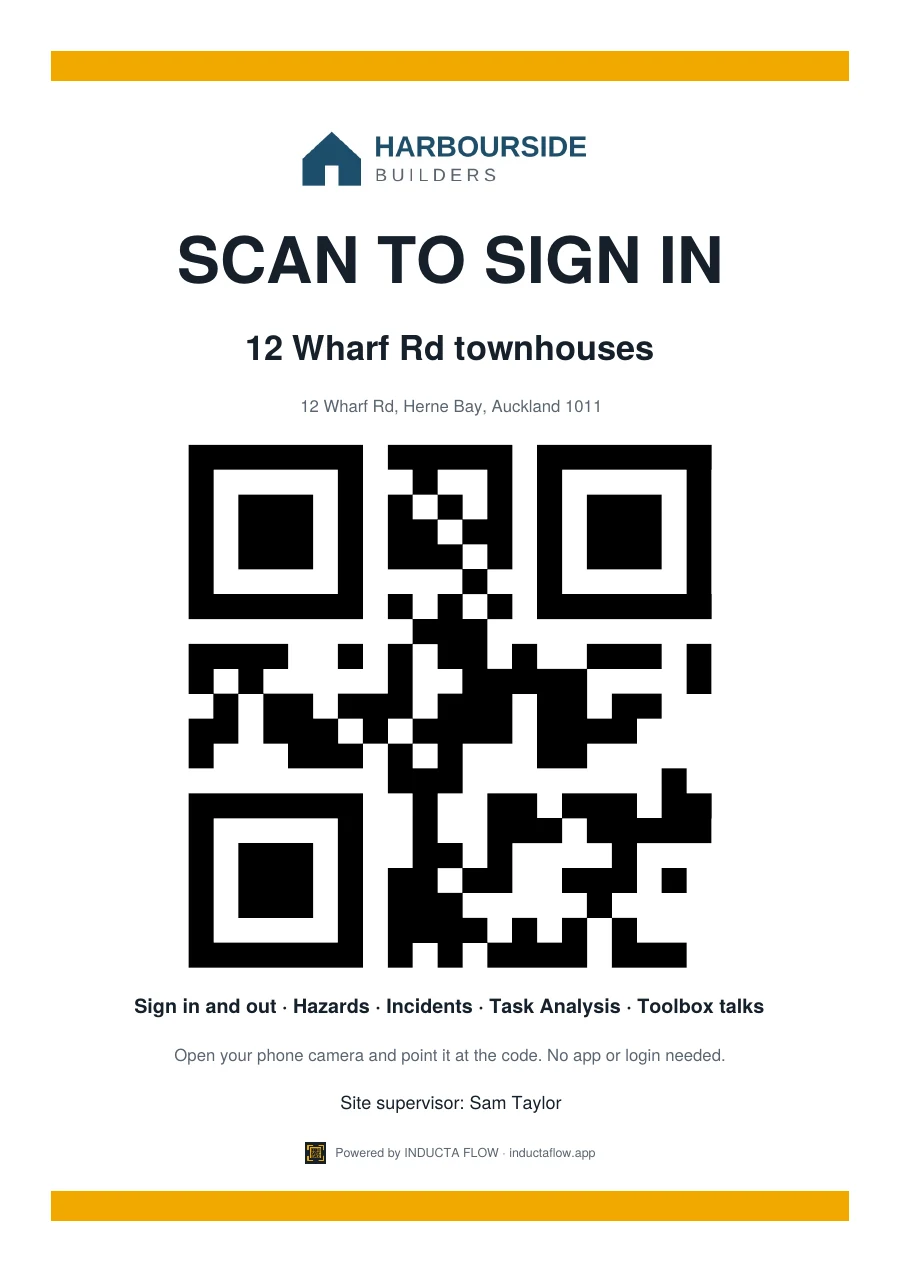
Every site gets a print-ready sign with your logo and its own QR code, free. It names the site and address, lists what workers can do from it, and shows your site supervisor.
Download it as a PDF in four sizes. Print A4 or A3 in the office, or send A2 or A1 to a sign shop for weatherproof corflute.
A1 (594 × 841 mm) is also available for the main entry.
Questions builders ask
Do workers need to download an app or make an account?
No. They point their phone camera at the QR sign and tap the link. The forms open in their browser, and their name, company and mobile are remembered on their phone for next time.
What happens when there’s no phone signal on site?
Once the forms have been opened once, they keep working offline. Anything filled in without signal is saved on the phone and sent by itself when it’s back in range.
Can someone sign in from the pub instead of the site?
Not if you don’t want them to. Turn on the location check for a site and every sign-in records how far the phone was from the site, or set it so sign-in only works on site. Only the distance is kept, not where the person is.
Does Inducta Flow make us compliant?
It gives you a reliable way to collect and keep sign-ins, Task Analysis sign-ons, subcontractor documents, hazard reports and toolbox talk records. Your duties under the Health and Safety at Work Act 2015 stay with your business, and templates need adapting to your site and work before use.
Where is our data stored?
In a secure database in Sydney, Australia (under the NZ Privacy Act 2020 as well). Each company can only see its own sites and records.
What counts as a new site?
Each job you set up with its own QR code. Your plan includes 3 new sites a year. Sites stay active as long as you need them. Extra sites are NZ$69 each, paid once.
Can we try it first?
Yes. Every new business gets 14 days free with every feature, and no card is needed to start.
Put your next site on Inducta Flow
- Set up a site and print its QR sign in about ten minutes
- No app or login for workers, and it works with no signal
- Unlimited workers and forms; you pay for the business, not the headcount
- Built for the Health and Safety at Work Act 2015
- 14 days free, no card needed